How to Make AI Video Art: What Actually Works in 2026
Why Most AI Video Art Tutorials Miss the Point
Type 'how to make AI video art' into Google and you get keyframe tutorials and node graphs. Most people asking that question have a character in mind, or an idea for a scene, and want a clip out of it. No software degree required.
What the tutorial crowd never says out loud is that there are two real paths, and they only ever describe the harder one. The stitched path goes like this:
- Generate a still in one image tool, re-roll until the face is right.
- Export it, upload to a separate video generator, wait, download an MP4.
- Edit in a third app to trim, extend, or add a second shot — then notice the face drifted between tools.
- Repeat from step one, because the character you built has no memory of who she was five minutes ago.
Four logins, three exports, zero continuity. It works, in the way a hand-built bicycle works.
The direct path is doing all of it inside one app that already knows your character — the one you chat with, the one whose photos are in your gallery. GoLove.ai's generator has separate Video and Image tabs, runs per-character (swap the avatar top-right), and assembles a clip from preset cards — action, clothes, background — with one Generate tap. Same face in the chat, same face in the gallery, same face in the clip. That's the whole pitch, and I'd argue it matters more than any single video feature.
The rest of this piece walks the direct path: photo-to-clip first, prompt-built scenes, extending past the ending, chaining moments, and what still feels rough around the edges.
From Her Photo to a Moving Clip
Start with the character, not a blank prompt — and definitely not a photo you upload yourself. GoLove lists "Generate Video from Photo" as an in-chat feature, but the photo it means is one of hers: a shot already sitting in her gallery from a chat or a Generate session. Nothing here starts from a photo you supply. Create her or pick her from Explore first, then open her gallery (organized per character, by date, so the shot you liked last week is still sitting there), pick one of her photos, choose a video action, and the app hands back a short moving clip of that same character. Not a lookalike. Her.
Here's the desktop version step by step. Open Generate. Check that the right avatar is loaded top-right — easy to skip, and you'll regret skipping it. Switch to the Video tab and open the Presets dropdown. The presets are visual cards, not a blank prompt box; for realistic characters there are 76 video modes, from tame ones like 'Twerk' and 'Instant Undress' through to the explicit end of the list. Add a Clothes card and a Background card if you want those changed, then Generate.
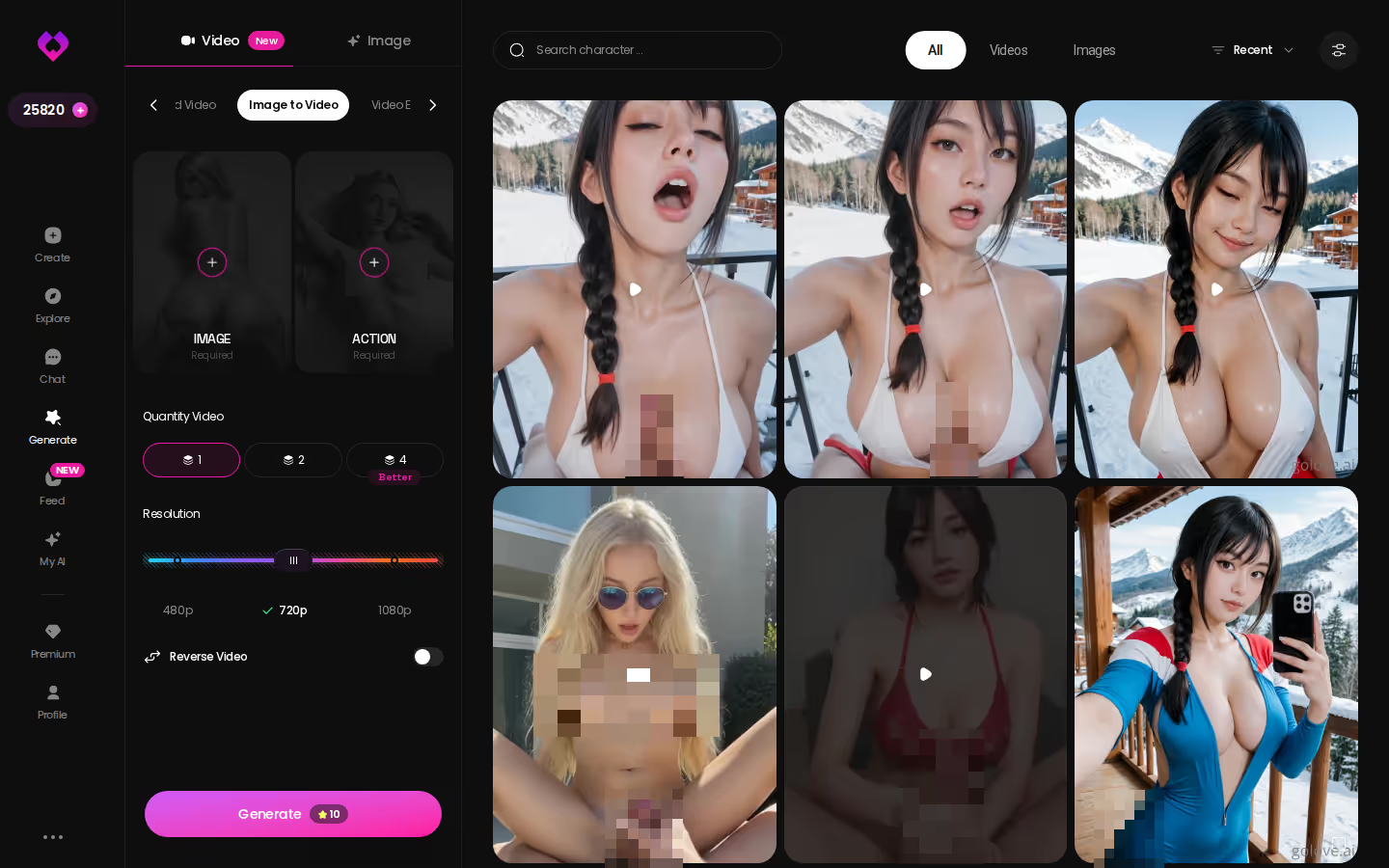
The one setting that mattered: which photo you pick. Choose a gallery shot of the character in roughly the pose you want to see move, and the output stays on-model. Pick a shot that isn't hers and you're right back to the stitched-path problem — a face that belongs to no one.
If you already have a character you like, this is the fastest way to see her move — and the 2 free daily Stars mean you can run the whole flow before spending anything.
Building a Scene From a Prompt Instead of a Photo
Don't have a character yet? Then the prompt route starts one step earlier. On mobile, Generate is a first-class tab in the bottom nav next to Explore, Chat, Create and Feed, so this is a thumb-only workflow.
Step one is choosing who's in the clip. Pull any existing GoLove character, or build your own under Create — Realistic, Anime, or Trans — including 'Design with AI', where you describe the concept in a sentence and the app generates the character card for you. That card becomes the anchor for everything after: chat, photos, and eventually video.
Step two is the scene, and this is where GoLove's approach differs from a prose-prompt tool. It wants a stack of preset cards: one action/pose, one Clothes card from the 21 outfits, one Background from the 34 available (or a custom one). Custom text goes on top of that structure, not in place of it.
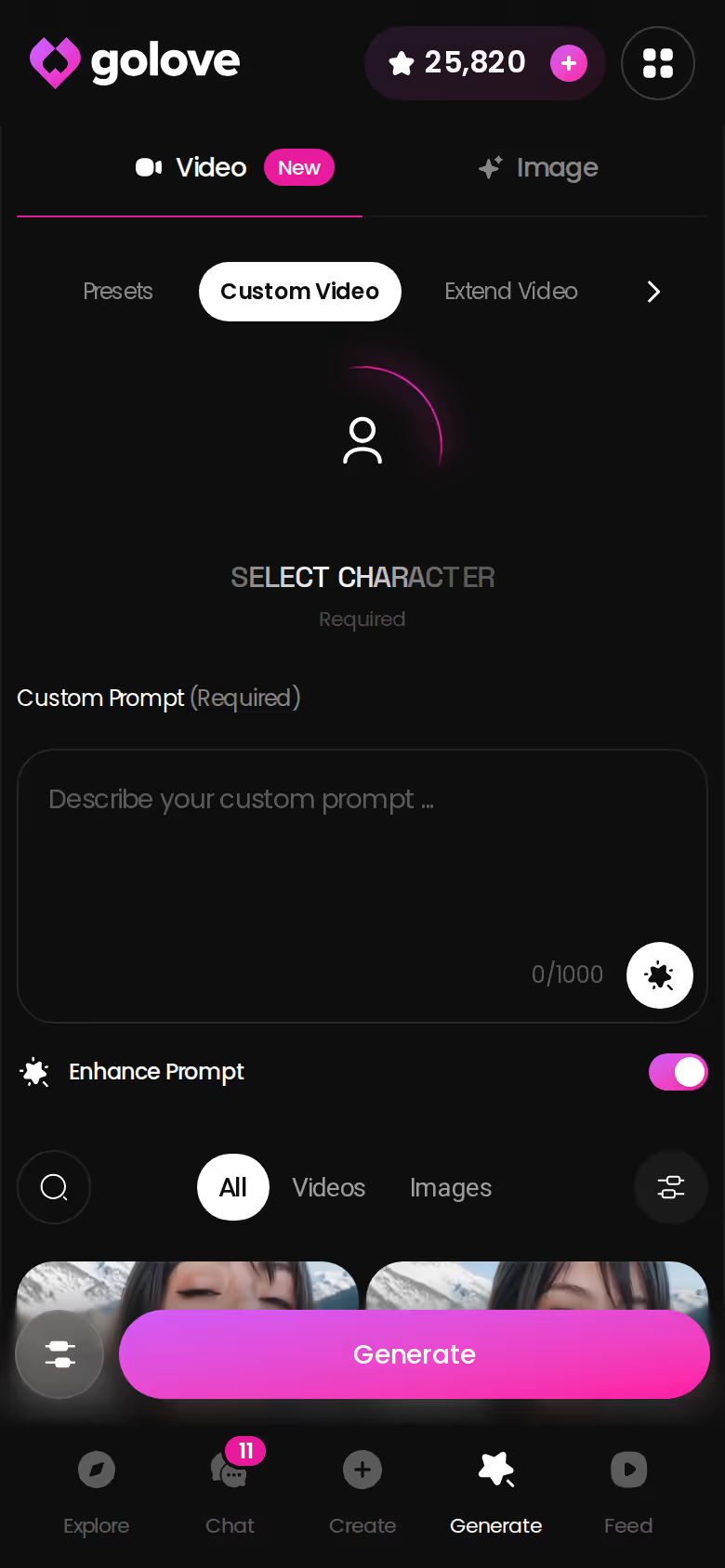
Step three: Generate, wait, watch.
The mistake I see most is over-prompting — a 200-word cinematic brief with camera moves, lighting notes and three separate actions. The generator reads a preset plus a short modifier well. It reads a screenplay badly, and what comes back is a clip that half-does everything and commits to nothing. One action card, one outfit, one location. Want a second action? That's a second clip, which is exactly what extending and chaining are for.
When One Clip Isn't Enough
This is the before-and-after that separates a real video tool from a wallpaper animator.
Before: you generate a clip and it ends right when it gets good. The stitched-path fix is to regenerate from scratch and hope the second roll resembles the first. It won't — the seed changed.
After: you extend. The extend flow takes the clip you already have and continues it past the original ending, keeping the character, outfit and background from the first pass rather than re-rolling them. On mobile it lives right on the generated clip, so the loop is generate → watch → extend → watch again, with no export button to hunt for.
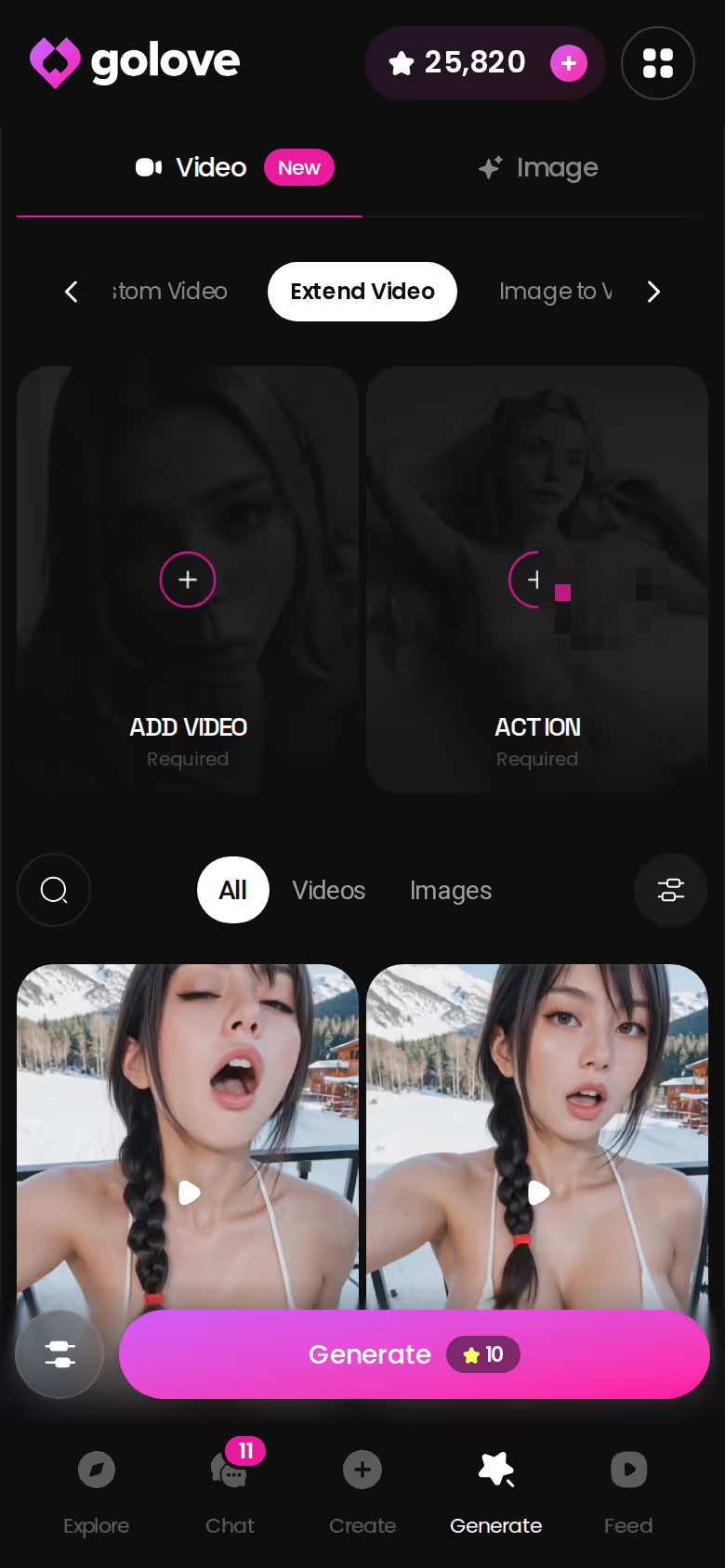
Does extending a clip use the same credits as a new one? Honest answer: the per-video Star cost isn't something GoLove publishes in a way I can verify, so I won't quote a number. Every generation spends Stars from the balance in your header, and an extension is a generation. Watch that counter before and after your first extend — that's the real price list.
Where this kinda nailed it: continuity. Where it fell short: an extension continues the moment, it doesn't change it. Different action? You don't extend. You chain.
Chaining Moments Into One Longer Video
Chaining is the multi-scene answer to the screenplay problem from earlier. Rather than cramming three actions into one prompt, you build each moment as its own preset stack — same character, different action card — and link them into one continuous video. The desktop builder makes this visible: scenes sit in sequence, and the character, clothes and background carry over unless you swap a card.
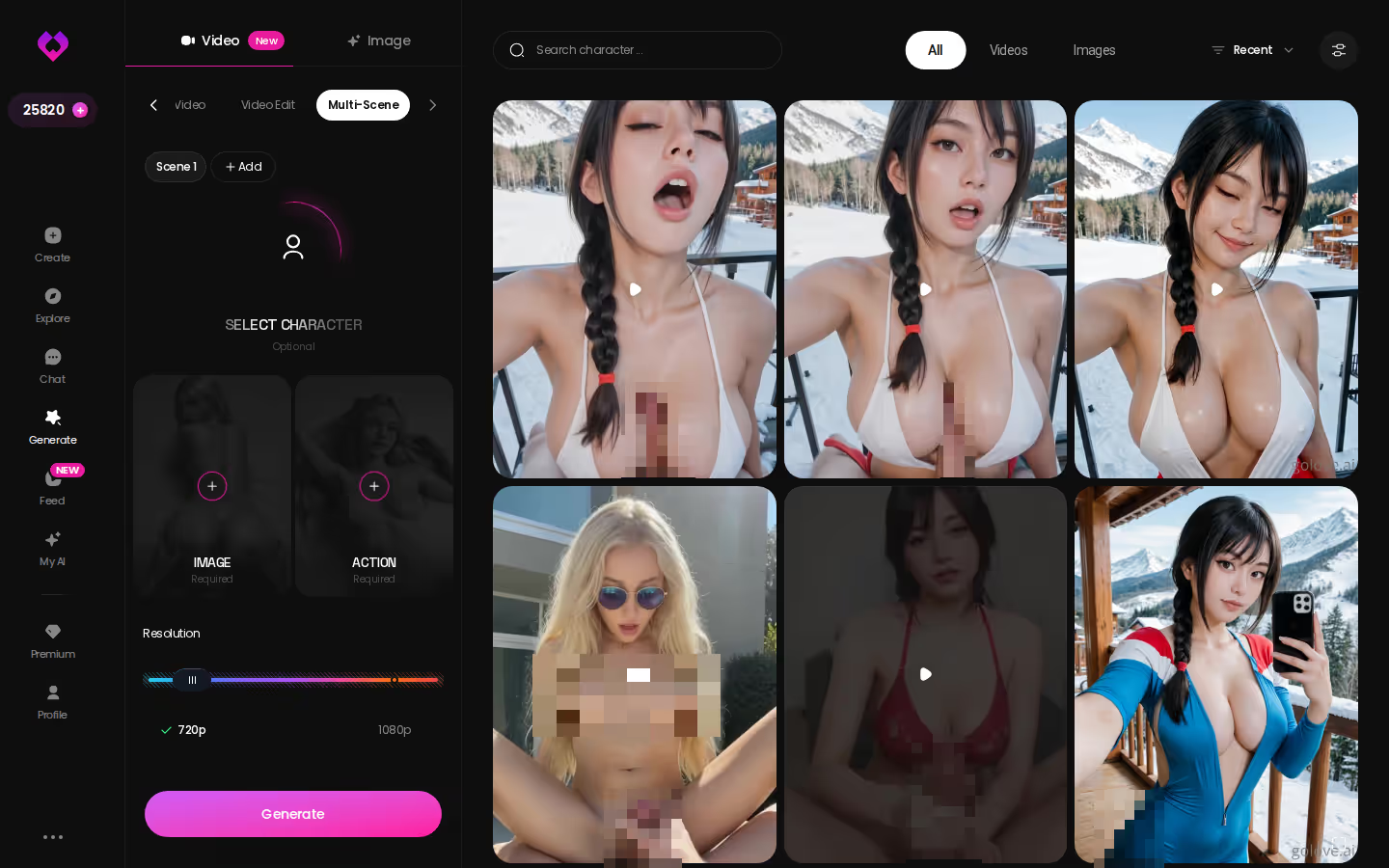
My practical rule: change one card per scene. Swap the action, keep the outfit. Then swap the background, keep the action. Each scene stays readable and the join looks like you meant it.
Now the money question. Everything in the generator runs on Stars, so plan tier and Star balance are two separate levers — and conflating them is how people end up on PRO wondering why they still can't generate. Prices checked 2026-07-19; they vary by region and promo (some geos run closer to ~$12.99/month, and -50% / -70% banners come and go).
| Plan | Approx. price | What it gets you for video |
|---|---|---|
| Free | $0 | 2 free Stars per day, full generator access, limited new Feed videos daily |
| GoLove PRO monthly | about $19.99/mo | Unlimited Feed + Feed filters (Realistic/Anime, gender, age); Stars still fund generations |
| GoLove PRO annual | about $119.88/yr (~$9.99/mo) | Same PRO perks, cheapest per month; ~$49.80 promo seen |
| Star packs | about $9.99 – $179.99 | Starter through 'maximum' tiers; the fuel for extend and chained scenes |
The takeaway: PRO is the Feed and filter unlock. Extending and chaining are Star spend, so a Star pack does more for a heavy video user than the subscription alone.
What We Couldn't Verify at GoLove.ai
Here's the trade you're making by picking one app over a stitched pipeline: you get continuity and a character with memory, and you give up the transparency of tools that publish every parameter. A few things I can't confirm from the documented product, so treat them as open:
- Pricing — the ~$19.99/mo and ~$119.88/yr figures are as of 2026-07-19, regional, and the -70% banner is a promo, not a permanent rate. Confirm on the checkout screen, not from me.
- Rework depth — the video-edit flow exists, but how far it goes beyond re-picking preset cards (frame-level fixes? partial re-rolls?) isn't documented, and I won't pretend I've measured it.
- Multi-scene length — how many scenes chain before quality or duration hits a wall is a moving target while the toolset keeps changing.
- Star cost per clip — not published; the header counter is your only reliable meter.
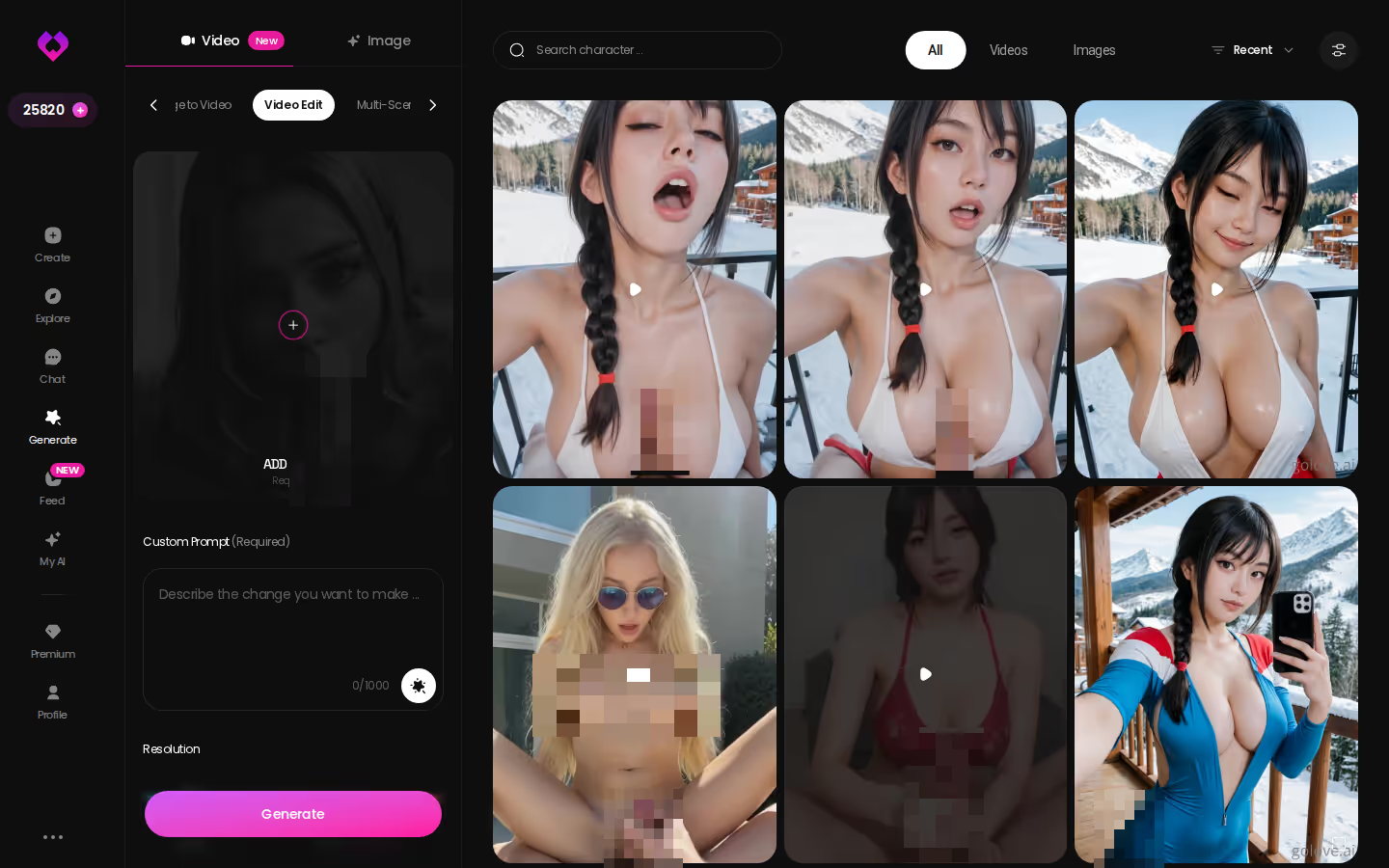
None of these are deal-breakers for the intent here — turning a character you already like into a clip. They are the reason my verdict is "start with the free Stars and check the counter," not "buy the biggest pack on day one."
The Verdict: The Direct Path Wins
Back to the two paths. The stitched route — separate image generator, separate video tool, separate editor — still produces AI video art, and if you want full control over every seed and frame, it's the honest choice. Runway-style tools do things GoLove doesn't attempt, like editing footage you shot yourself. Credit where it's due.
But that's not what most people typing this query want. They want a character, then a clip of her — and then, spot on, to keep talking to her afterwards. That's where GoLove.ai wins and the stitched path can't compete: photo-to-video from the gallery, prompt-built scenes from preset cards, extend past the ending, chain moments, edit — all attached to a character with memory, voice calls, a per-character photo library and a chat history. The video is one output of a relationship, not a disconnected render you re-upload somewhere else.
> Who this is for: adults already comfortable with AI companion apps who want to see their character move without learning a pipeline. > One line: if you want your AI video art to star someone you actually talk to, make the character first and let the clips follow.
The fastest start is building the character now — Realistic, Anime, Trans, or 'Design with AI' from a sentence — because every clip, photo and extension afterwards is anchored to that one card.
What good looks like, in one checklist:
- Real-time voice calls with per-character voices
- Memory across chats — she remembers your details
- In-chat image generation — 35 poses and 21 outfits
- 2 reward stars every day you log in
See also: AI Girlfriend Live Video, AI Girlfriend Video Generator and NSFW AI Art Generator.
| What you get | GoLove.ai |
|---|---|
| Real-time voice calls | Yes — per-character voices |
| Memory across chats | Yes — remembers your details |
| In-chat image generation | Yes — 35 poses & 21 outfits |
| Daily reward stars | 2 every day |
Related Articles
Video Greeting From Your AI Girl: What Actually Works
Video greeting from an AI companion? GoLove.ai wins — describe the clip, pick 720p or 1080p, set 5–15s, then extend it. See it with any character.
AI Video Sex Chat: What Actually Works in 2026
AI video sex chat, honestly reviewed — GoLove wins with real in-chat video generation, voice, and memory. Start chatting, no email needed.
AI Hentai Video: What Actually Works in 2026
AI hentai video, honestly reviewed — GoLove wins on voice, memory and remixable clips. See a live result, instant-access needed.
AI Generated Hentai Manga: What Actually Works in 2026
AI generated hentai manga, honestly compared — GoLove.ai wins on character memory and consistent in-chat photos. See how panels become a living story.
This article contains affiliate links. We may earn a commission at no extra cost to you if you sign up through our links. See how we test.